Everywhere Clipboard Pro1.2.2
Publisher Description
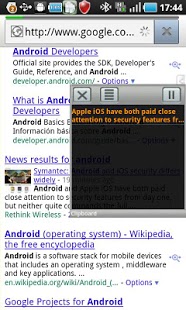
Everywhere Clipboard extends Android clipboard function and brings real desktop clipboard experience to you on mobile phone. Imagine a clipboard panel that you can quickly locate, copy, paste, and delete from clipboard history without leaving your current window.
Unlike other clipboard apps found in Android Market, Everywhere Clipboard quick panel can be used anywhere in any window instantly and can be hidden at any time too and that makes it superior than any other existing solution. It also reads txt file for copy and paste action too!
If you are a heavy email or note taking user, you will find Everywhere Clipboard increase your productivity to next level. Thanks to its desktop like clipboard solution.
Features
☆ Instant on, always available clipboard panel
☆ Manage content to copy from files/folders
☆ Built in note editor for quick file creation
☆ Easy to use folder management
☆ Supports both clipboard history based or file based copy
☆ More to come.............
Added features in PRO
☆ Unlocked clipboard history limit
☆ Able to create multiple folder for text file management
☆ Ads removal
About Everywhere Clipboard Pro
The company that develops Everywhere Clipboard Pro is Kiumiu.CA. The latest version released by its developer is 1.2.2. This app was rated by 5 users of our site and has an average rating of 2.4.
To install Everywhere Clipboard Pro on your Android device, just click the green Continue To App button above to start the installation process. The app is listed on our website since 2013-02-27 and was downloaded 228 times. We have already checked if the download link is safe, however for your own protection we recommend that you scan the downloaded app with your antivirus. Your antivirus may detect the Everywhere Clipboard Pro as malware as malware if the download link to com.smart.clipboard is broken.
How to install Everywhere Clipboard Pro on your Android device:
- Click on the Continue To App button on our website. This will redirect you to Google Play.
- Once the Everywhere Clipboard Pro is shown in the Google Play listing of your Android device, you can start its download and installation. Tap on the Install button located below the search bar and to the right of the app icon.
- A pop-up window with the permissions required by Everywhere Clipboard Pro will be shown. Click on Accept to continue the process.
- Everywhere Clipboard Pro will be downloaded onto your device, displaying a progress. Once the download completes, the installation will start and you'll get a notification after the installation is finished.
Program Details
System requirements
Download information
Pricing
Version History
version 1.2.2
posted on 2013-02-27
Several fixes and updates
version 1.2.2
posted on 2013-02-27
V1.2.2,Fixed,(1) Add support to non standard screen dimension,V1.2.1,Added,(1) ICS start on boot support,V1.2,Fixed:,(1)Crash on SD card removal,(1)Crash if default folder is deleted,Added:,(1) Option for toast notification on copy,(2) Confirmation on Clear all clipboard history,V1.1,Fixed:,(1) Incorrect popup location when trigger side is set to left,(2) Removed a trailing linefeed when copy from txt,(3) Fixed Pause button trigger area wider than displayed.
